
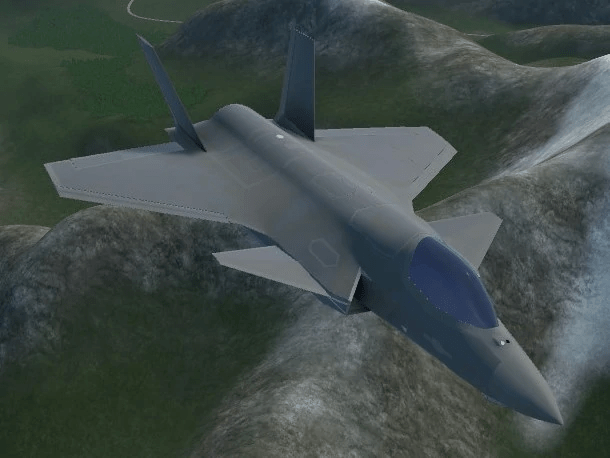
F-45A
F-45A는 연합군이 사용할 수 있는 날렵한 고정익 항공기이다. 주로 공대지 전투용으로 제작되었지만, 통합 레이더를 갖추고 있으며 공대공 전투도 처리할 수 있다. 게임 내에서 유일하게 내부 무기 베이가 내장되어 있어 필요할 때까지 항공기 내부에 탄약을 보관할 수 있다. 이는 F-45A에 두 가지 중요한 영향을 미친다: F-45A는 항공기 전체의 항력을 감소시켜 공기 중 속도를 높일 수 있게 하고, 레이더 횡단면을 감소시켜, 탐지 전에 레이더 소스로 더 가까이 이동하게 하고, 기존의 회피 기동을 통해 레이더 잠김을 더 쉽게 탈출할 수 있게 한다.
The F-45A (a.k.a Ghost) is a sleek fixed-wing aircraft available to the Allied faction designed with stealth engagement in mind. It is intended primarily for Air-to-Ground combat, but it has an integrated radar equipped and can handle Air-to-Air combat as well. It is the only playable aircraft in the game that has an integrated internal weapons bay, allowing it to store its munitions inside the aircraft until needed. This has two main implications for the F-45A: it decreases drag across the aircraft, allowing it to reach higher In-Air Speeds, while also decreasing its radar cross-section as well, letting it both move closer to a radar source before detection and escape radar-locks more easily through conventional evasive maneuvers.
Strategy
전략
The F-45A is arguably one of the most specialized playable aircraft in the game, intended almost exclusively for use in stealth-oriented roles. It was created in response to the growing threat of hostile surface-based air defenses, especially where stronger modern ground radars and SAM launchers were concerned. It is designed with pop-up attacks in mind, striking nearby targets before dipping back into cover or even striking targets from behind it. Even though it is not capable of equipping any Anti-Radiation Missiles, the F-45A can be a deadly asset in SEAD ops due in part to its aptitude in the area of evading radar-guided missiles. In scenarios where stealth is not required, though, the F-45A has the capacity to fit six extra pylons on its wings, allowing it to function as a versatile assault aircraft as well when needed.
F-45A는 거의 스텔스 지향적인 역할만을 위해 고안된 게임 내에서 가장 특화된 플레이 가능한 항공기 중 하나이다. 그것은 특히 더 강력한 현대식 지상 레이더와 SAM 발사대가 우려되는 적대적인 지상 기반 방공의 증가하는 위협에 대응하여 만들어졌다. 이것은 팝업 공격을 염두에 두고 설계되었으며, 주변 목표물을 공격한 후 다시 엄폐물에 빠지거나 심지어 뒤에서 목표물을 공격하기도 한다. F-45A는 대방사능 미사일은 탑재할 수 없지만 레이더 유도 미사일의 회피 능력이 뛰어나기 때문에 SEAD 작전에 치명적인 자산이 될 수 있다. 스텔스가 필요 없는 상황에서 F-45A는 날개에 6개의 추가 송유관을 장착할 수 있어 필요할 때 다용도 강습기 역할을 할 수 있다.
In stealth-oriented roles, maneuverability and mobility are going to be key assets to an aircraft for remaining undetected when needed. As such, the F-45A has full VTOL capability. It can vector its thruster to 90 degrees to hover in a single place for extended periods of time, take off and land from smaller areas like helipads, or even for making strafing runs against ground targets.
스텔스 지향적 역할에서 기동성과 기동성은 필요할 때 감지되지 않은 채로 남아있기 위한 항공기의 핵심 자산이 될 것이다. 이와 같이 F-45A는 VTOL 기능을 모두 갖추고 있다. 그것은 한 장소에서 오랜 시간 동안 공중을 맴돌거나, 헬기장과 같은 작은 지역에서 이착륙하거나, 심지어 지상 목표물을 향해 직선 비행을 하기 위해 90도로 돌진할 수 있다.
Armament
무기
Main article: F-45A Hardpoints
주요 기사: F-45A 하드포인트
Avionics
항공전자
Vertical Control Autopilot (VCAP)
수직 제어 자동 조종(VCAP)
This auto pilot mode eases the workload in the transition between wing-borne and jet-borne flight. The idea is that, the throttle controls forward and aft acceleration, with the middle setting being zero acceleration. Pitch controls change in altitude. The computer will decide what is needed to achieve that depending on where in the flight envelope the plane is. For example, at low speeds altitude is changed by varying engine thrust, while at high speeds the computer opts to vary nose attitude. Pulling back on the stick doesn’t explicitly mean “pitch up”. Forward acceleration is accomplished by tilting the plane like a helicopter at low speeds, or changing nozzle tilt and thrust at high speeds.
이 자동 파일럿 모드는 날개 기반 비행과 제트 기반 비행 사이의 전환에서 작업 부하를 완화합니다. 이 아이디어는 스로틀이 전방 및 후방 가속을 제어하고 중간 설정은 0 가속입니다. 피치 컨트롤은 고도가 변경됩니다. 비행기가 비행 봉투의 어디에 있느냐에 따라 컴퓨터는 그것을 달성하기 위해 무엇이 필요한지를 결정할 것이다. 예를 들어, 저속에서는 엔진 추력이 변화하여 고도가 변경되는 반면 고속에서는 컴퓨터가 노즈 자세를 변화시킨다. 막대기를 빼는 것이 명시적으로 “힘내라”는 것을 의미하지는 않는다. 전방 가속은 저속에서는 헬리콥터처럼 비행기를 기울이거나 고속에서는 노즐 기울기와 추력을 바꾸는 방식으로 이뤄진다.
VCAP will not activate unless the TWR is 1.04 or higher.
VCAP는 TWR이 1.04 이상이 아니면 활성화되지 않습니다.
Takeoff
이륙
- Turn VCAP on and center the throttle. This ensures the plane will lift straight up. Afterburner is not available when the nozzle is rotated downwards more than zero degrees.
- VCAP를 켜고 스로틀의 중심을 맞춥니다. 이것은 비행기가 똑바로 들어 올릴 수 있도록 보장합니다. 노즐이 0도 이상 아래로 회전하면 애프터버너를 사용할 수 없습니다.
- Pull the stick back to ‘pitch up’. Notice that the engine will begin to spool up, and the plane will ascend.
- 스틱을 뒤로 당겨서 위로 올리세요. 엔진이 스풀업하기 시작하고 비행기가 상승하는 것을 주목하십시오.
- Push the throttle forward to begin accelerating forward. Notice that the aircraft will initially pitch nose-down like a helicopter. Then, with increasing horizontal speed, the nose will rise, and the computer will use nozzle tilt more.
- 가속을 시작하려면 스로틀을 앞으로 미십시오. 항공기는 처음에 헬리콥터처럼 기수를 아래로 향하게 된다. 그러면 수평 속도가 증가하면 코가 올라가고 컴퓨터가 노즐 기울기를 더 많이 사용하게 됩니다.
- At around 80kts, VCAP stops feeling like a helicopter and begins to react more like a plane. While pulling the stick back to increase altitude still spools up the engine, the aircraft starts to pitch up. The middle throttle position also tends to hold this speed, but it’s around the upper limit.
- 약 80kts에서 VCAP는 헬리콥터 같은 느낌을 멈추고 비행기처럼 반응하기 시작한다. 고도를 높이기 위해 스틱을 뒤로 당기는 동안 항공기는 위로 올라가기 시작한다. 중간 스로틀 위치도 이 속도를 유지하는 경향이 있지만 상한가 수준이다.
- At around 120kts, VCAP will rapidly start to rotate the nozzle forward to zero degrees in order to accelerate faster, all of which tends to override the middle throttle setting. The lift fan door will start closing to decrease drag, because the burden of providing lift shifts over to the wing and away from the nozzle.
- VCAP는 약 120kt에서 가속을 위해 노즐을 0도로 빠르게 회전시키기 시작하며, 이 모든 것이 중간 스로틀 설정을 무시하는 경향이 있습니다. 리프트 팬 도어는 드래그를 줄이기 위해 닫히기 시작합니다. 리프트를 제공하는 하중이 윙으로 이동하고 노즐에서 떨어지기 때문입니다.
- When VCAP is finished to transitioning to wing-borne flight, afterburner and full roll authority is restored.
- VCAP가 날개 기반 비행으로의 전환이 완료되면 애프터버너 및 풀 롤 권한이 복원됩니다.
Vertical Landing
수직착륙
This auto pilot mode also helps the pilot perform vertical carrier landings. Patterns are similar to aircraft carrier recovery patterns, but the meatball and glide slope terminate in a hover stop next to the carrier. The plane then crosses over to hover above the landing spot. Finally, the plane descends.
이 자동 파일럿 모드는 조종사가 수직 항공모함 착륙을 수행하는 데에도 도움이 됩니다. 패턴은 항공모함 회수 패턴과 유사하지만, 미트볼과 활공 경사는 항공모함 옆의 호버 스톱에서 종료된다. 그리고 나서 비행기는 착륙 지점 위를 맴돌기 위해 건너간다. 마침내 비행기가 하강한다.
In VTOL VR, the middle throttle position will hold 50kts forward, which allows the aircraft to fly stationary relative to a moving vessel. When descending, the autopilot will choose a safe vertical speed.
VTOL VR에서는 중간 스로틀 위치가 50kts 전방으로 유지되어 항공기가 움직이는 선박에 상대적으로 정지하여 비행할 수 있습니다. 하강할 때, 자동 조종은 안전한 수직 속도를 선택할 것입니다.
Internal Bays
내부 베이
There are 4 internal bays on the F-45A: two at the sides for small missiles and two larger ones below for bigger weapons. The actuation of the internal bay doors changes behavior depending on the weapon type selected.
F-45A에는 4개의 내부 베이가 있다: 두 개는 측면에, 두 개는 더 큰 무기를 위해 아래에 있다. 내부 베이 도어를 작동하면 선택한 무기 유형에 따라 동작이 변경됩니다.
- When IR missiles are selected, the side bay doors are always open if the TRIG UNCAGE setting is OFF. This is allows the IR missile rack to swing out of the bay so the seeker can see forward. This does not apply to AGM-145s stored within the side bays.
- IR 비산물을 선택할 때 TRIG UNCAGE 설정이 OFF이면 사이드 베이 도어가 항상 열립니다. 이것은 IR 미사일 랙을 만 밖으로 흔들어서 찾는 사람이 앞을 볼 수 있게 해줍니다. 이것은 사이드 베이 내에 보관된 AGM-145에는 적용되지 않는다.
- For bomb release, a double action fire control is used. Holding the trigger opens the bay doors, and the cycle weapon button acts as a release button.
- 폭탄 방출을 위해, 이중 액션 사격 제어 장치가 사용된다. 방아쇠를 누르면 베이 도어가 열리고 사이클 무기 버튼이 해제 버튼 역할을 합니다.
- For other weapons where introducing a delay isn’t a problem, pulling the trigger once automates the cycling of the bay doors and weapon release (AIM-120s, AGMs, etc.).
- 지연이 문제가 되지 않는 다른 무기의 경우, 일단 방아쇠를 당기면 베이 도어와 무기 방출(AIM-120s, AGM 등)의 사이클이 자동화된다.
Glass Cockpit UI
글라스 콕핏 UI
On the F-45A there’s one giant touch screen that can be divided into a maximum of 4 displays or a minimum of 2 displays. The arrows on the dividers of these collapse and expand them. Most pages are ported over from the MFDs of the other planes with modifications to work with touch screens. There are some pages unique to the F-45A.
F-45A에는 최대 4개의 디스플레이 또는 최소 2개의 디스플레이로 나눌 수 있는 하나의 거대한 터치 스크린이 있습니다. 이 칸막이에 있는 화살은 무너지고 확장된다. 대부분의 페이지는 터치 스크린에서 작동하도록 수정한 다른 평면의 MFD에서 포팅됩니다. F-45A만의 독특한 페이지가 있습니다.
Each window can be assigned a unique MFD page, which can be swapped out with the minimized pages by clicking on the corresponding tab. Tabs start off as BLANK by default and cannot be closed like an internet browser. BLANK tabs bring up the menu matrix when opened. Pressing a tab will swap the places of the open and minimized window. For example, NAV will become minimized to replace BLANK in the tab, and BLANK will be pulled up to show the menu.
각 창에는 고유한 MFD 페이지를 할당할 수 있으며, 해당 탭을 클릭하여 최소화된 페이지와 바꿀 수 있습니다. 탭은 기본적으로 공백으로 시작되며 인터넷 브라우저처럼 닫을 수 없습니다. BLANK 탭은 열려 있을 때 메뉴 매트릭스를 표시합니다. 탭을 누르면 열려 있는 창과 최소화된 창의 위치가 바뀝니다. 예를 들어, 탭의 BLANK를 대체하기 위해 NAV가 최소화되고 BLANK가 위로 올라와 메뉴가 표시됩니다.
Alternatively, tabs have an mini window form, allowing the display of widgets (currently only the TGP/EOTS and RWR). Otherwise, that window only shows the title of the page.
또는 탭에는 작은 창 형식이 있어 위젯(현재 TGP/EOTS 및 RWR만)을 표시할 수 있습니다. 그렇지 않은 경우, 해당 창은 페이지의 제목만 표시합니다.
The SWAP button swaps left and right windows, and as a pair if there are multiple. This allows one to manage all windows with the left arm without needing to cross over the arm still holding the flight stick.
SWAP 버튼은 왼쪽과 오른쪽 창을 맞바꾸고, 여러 개가 있을 경우 쌍으로 바꿉니다. 이는 비행봉을 잡고 있는 팔을 교차할 필요 없이 왼쪽 팔로 모든 창문을 관리할 수 있게 해준다.
To prevent duplicates, the page opened in another window will be closed while bringing it over to the new window.
중복을 방지하기 위해 다른 창에서 열린 페이지를 새 창으로 가져오는 동안 페이지가 닫힙니다.
Electro-Optical Targeting System (EOTS)
전자 광학 타겟팅 시스템(EOTS)
This controls what is essentially the F-45A’s TGP. A notable new feature is that the EOTS can directly snap to a detected unit by using the TSD. This is simpler than managing several pages, such as the NAV and GPS for locking the TGP onto ground units.
이것은 F-45A의 TGP를 제어한다. 주목할 만한 새로운 기능은 TSD를 사용하여 감지된 장치에 EOTS가 직접 스냅할 수 있다는 것입니다. 이 방법은 TGP를 접지 장치에 잠그는 NAV 및 GPS와 같은 여러 페이지를 관리하는 것보다 간단합니다.
Stores Management System (SMS)
저장고 관리 시스템(SMS)
This page is similar to the F/A-26B and the AV-42C EQUIP page, where weapon configurations, arming status, and jettison status can be altered. However, there are 3 main differences:
이 페이지는 무기 구성, 무장 상태 및 분사 상태를 변경할 수 있는 F/A-26B 및 AV-42C Equip 페이지와 유사합니다. 그러나 다음과 같은 3가지 주요 차이점이 있습니다.
- The Countermeasures (CMS) page is now integrated into the SMS page, as opposed to having it’s own page.
- CMS(Requestments) 페이지는 이제 자체 페이지가 아닌 SMS 페이지에 통합됩니다.
- The FUEL CONFIG page is now moved from the OPTION page to the SMS page. The fuel dump option is located here as opposed to a physical cover and switch.
- 이제 FUEL CONFIG 페이지가 OPTION 페이지에서 SMS 페이지로 이동되었습니다. 연료 덤프 옵션은 물리적 커버 및 스위치와 반대로 여기에 있습니다.
- The BAY DOOR OVERRIDES page is included in this page for manual override of the internal bay doors.
- 이 페이지에는 내부 베이 도어를 수동으로 재정의할 수 있는 BAY DOOR OVERRIDE 페이지가 포함되어 있습니다.
Instead of a jettison button panel seen in the F/A-26B and the AV-42C, this aircraft is equipped with a jettison combination selector switch/push button. To use the selector switch/push button, press and hold the trigger to grab the selector switch, twist your controller to move the switch to the desired setting, and press the countermeasures/weapon switch button to engage the setting. There are three options:
이 항공기는 F/A-26B와 AV-42C에 보이는 분사 버튼 패널 대신 분사 조합 선택 스위치/누름 버튼이 장착되어 있습니다. 셀렉터 스위치/누름 버튼을 사용하려면 트리거를 길게 눌러 셀렉터 스위치를 잡고 컨트롤러를 돌려 스위치를 원하는 설정으로 이동한 다음 대책/무기 스위치 버튼을 눌러 설정을 활성화하십시오. 세 가지 옵션이 있습니다.
- SEL: Jettisons the stores selected in the SMS page, indicated by the orange border.
- SEL: 주황색 테두리로 표시된 SMS 페이지에서 선택한 스토어를 제거합니다.
- EXT: Jettisons all external stores.
- EXT: 모든 외부 스토어를 폐기합니다.
- ALL: Jettisons all stores.
- ALL : 모든 상점을 폐기합니다
Tactical Situation Display (TSD)
전술 상황 표시(TSD)
This page integrates data normally fragmented across several pages to create a 360 degree top down tactical awareness display. Units are populated here when detected as they would appear in NAV, RADAR, ARAD, or through the TGP. A unit will flash and then disappear when there is no spotting information from onboard system or allies. The addition of the cursor allows units to be designated for use of other systems while maintaining awareness. This avoids needing to switch between Air-to Air or Air-to-Surface workflows.
이 페이지는 일반적으로 여러 페이지에 걸쳐 분할된 데이터를 통합하여 360도 하향식 전술 인식 디스플레이를 만듭니다. 장치는 NAV, RADAR, ARAD 또는 TGP를 통해 감지될 때 여기에 입력됩니다. 온보드 시스템 또는 얼라이언스에서 감지된 정보가 없을 때 장치가 깜박였다가 사라집니다. 커서가 추가되면 인식 상태를 유지하면서 다른 시스템을 사용하도록 장치를 지정할 수 있습니다. 따라서 Air-to-Air 또는 Air-to-Surface 워크플로우 사이에서 전환할 필요가 없습니다.
Designating a Target
대상 지정
Using the TSD cursor is similar to using the cursor on the RADAR page in the F/A-26B:
TSD 커서를 사용하는 것은 F/A-26B의 RADAR 페이지에서 커서를 사용하는 것과 유사합니다.
1. Set the TSD as SOI and slew the cursor onto a target with the left thumb stick. The cursor will snap to a unit.
1. TSD를 SOI로 설정하고 왼쪽 엄지 스틱으로 표적에 커서를 놓습니다. 커서가 장치에 스냅됩니다.
2. Center press to designate the unit as a target. In TSD, a purple broken circle will surround the target. An info box will appear giving information about the aircraft such as bearing, range, and altitude.
2. 중앙을 눌러 장치를 대상으로 지정합니다. TSD에서는 자주색으로 깨진 원이 대상을 둘러싸게 됩니다. 방위각, 항속거리 및 고도와 같은 항공기에 대한 정보를 제공하는 정보 상자가 나타납니다.
3. In the HUD, a green dotted circle will appear. This will hint if the target is air or ground.
3. HUD에서 녹색 점선이 나타납니다. 이것은 표적이 공기와 지면 중 어느 쪽인지를 암시할 것이다.
4. Pressing EOTS will snap the EOTS to that target (a more direct version of GPS-acquire for the TGP).
4. EOTs를 누르면 해당 표적에 EOTs가 스냅됩니다(TGP에 대한 보다 직접적인 GPS 수집 버전).
5. The target is automatically used in other pages and systems.
5. 대상은 다른 페이지와 시스템에서 자동으로 사용됩니다.
Air Units and AIM-120Ds
공기 장치 및 AIM-120D
The TSD will automatically manage the radar page as part of the fire control chain. This means that the radar must at least be turned on to fire the missile, but the page does not have to be visible on any window. Once fired, the missile will get the targeting data from either the F-45’s radar or from datalink. Using datalink lets an F-45 be able to turn off its radar (after firing) to allow the datalink to track the target.
TSD는 화재 통제 체인의 일부로 레이더 페이지를 자동으로 관리합니다. 미사일을 발사하려면 최소한 레이더를 켜야 하지만 어떤 창에도 페이지가 보이지 않아도 된다는 뜻이다. 미사일이 발사되면 F-45의 레이더나 데이터링크에서 표적 데이터를 얻을 수 있다. 데이터링크를 사용하면 F-45가 발사 후 레이더를 끌 수 있어 데이터링크가 목표물을 추적할 수 있다.
1. Designate a target.
1. 대상을 지정하세요.
2. Fly the radar cone onto the target to allow it to lock on. On the RADAR page, the TSD will enter Single Target Tracking. On the HUD, a weapon engagement range bar will appear. The unit needs to be kept within the radar cone for the initial missile guidance.
2. 레이더 콘을 표적에 띄워 고정시킵니다. RADAR 페이지에서 TSD가 Single Target Tracking(단일 표적 추적)으로 들어갑니다. HUD에 무기 장착 레인지 바가 나타납니다. 이 유닛은 초기 미사일 안내를 위해 레이더 콘 내에 있어야 한다.
Radar Emitters
레이더 방출기
There is no ARAD page, and the TSD doesn’t integrate the functions of that system.
ARAD 페이지는 없고 TSD는 해당 시스템의 기능을 통합하지 않습니다.
Radar emitters are automatically classified as air or ground and will show up on the TSD as such.
레이더 방출기는 자동으로 공기 또는 지상으로 분류되며 TSD에 이와 같이 표시됩니다.
Surface Units
지표면 단위
Enemy ground or sea units appear as an orange square. The designated target needs to be sent to the EOTS first for initial acquisition, lasing, and ranging. This is immediately available for laser guidance, or CCRP. For GPS weapons, the EOTS page needs to be used to create a GPS point for the GPS weapon workflow. There may be overlap between sea units and their subsystems such as turrets and radar antennae.
적의 지상 또는 해상 유닛은 주황색 사각형으로 나타납니다. 지정된 대상은 초기 획득, 레이스 및 범위 조정을 위해 먼저 EOTS로 전송되어야 합니다. 이 기능은 레이저 유도 또는 CCRP에 즉시 사용할 수 있습니다. GPS 무기의 경우, EOTs 페이지를 사용하여 GPS 무기 작업 흐름을 위한 GPS 지점을 만들어야 합니다. 바다 단위와 포탑과 레이더 안테나와 같은 하위 시스템 사이에 겹치는 부분이 있을 수 있다.
Friendly ground or sea units appear as the NATO symbol for air and space units (an upside down “U” ).
아군 육지 또는 해상 단위는 NATO의 항공 및 우주 단위 기호로 나타난다.
- VTOL-VR : F/A-26B
- VTOL-VR : F-45A